When does Walmart sell? Weekly and yearly movements in 70 store departments
PCA
retail
time
Five years of daily sales from ten Walmart stores, boiled down to two PCA biplots. One shows the weekly movement of each store department, the other the yearly movement and each tells a different story.
Author
Raeesa
Published
September 23, 2026
The data
The M5 Forecasting Accuracy data were released by Walmart for a forecasting competition hosted on Kaggle. They record the number of units sold, every day, for 3049 products in 10 stores across three US states: California (CA_1 to CA_4), Texas (TX_1 to TX_3) and Wisconsin (WI_1 to WI_3). The daily record runs for 1941 days, from 29 January 2011 to 22 May 2016.
Each product belongs to one of seven departments: three food departments (FOODS_1 to FOODS_3), two hobbies departments (HOBBIES_1 and HOBBIES_2) and two household departments (HOUSEHOLD_1 and HOUSEHOLD_2). A separate calendar table says which weekday and month each of the 1941 days falls on.
That is far too much for one picture: 30490 sales series of 1941 days each. A biplot needs a modest table of rows and columns, so the first job is to decide what a row should be and what a column should be.
The question
Shops have certain movements. Weekends are busier than weekdays and some goods sell in December that nobody buys in June. The question we ask is whether every part of Walmart shares the same movement or whether some stores and some departments march to their own beat. Specifically:
Do the three states differ in when during the week they sell?
Do the seven departments differ in when during the year they sell?
Preparing the data
We chose the store department as the row: one row for each of the 10 stores crossed with the 7 departments, giving 70 rows. Each row pools all the products in that department of that store.
For the columns we want a measure of movement, not of size. FOODS_3 sells more in a day than HOBBIES_2 sells in a month and if we used raw unit counts the picture would only show that food outsells hobbies. So for each store department we computed its average daily sales on, say, Saturday, and divided by its average daily sales across all days. A value of 1.2 means Saturdays run 20 percent above that store department’s own average and 0.8 means 20 percent below. Finally we took the logarithm, which makes “20 percent above” and “20 percent below” equally far from zero. These are the numbers the biplot axes are calibrated in.
This gives two tables with the same 70 rows:
a weekday panel with 7 columns, Monday to Sunday, and
a month panel with 12 columns, January to December.
Christmas Day was dropped before averaging because every store is closed and all sales are zero. The code below shows how the panels were built from the raw Kaggle files. It is not run on this page because the raw data are close to half a gigabyte, but the two finished panels are saved next to this post as small CSV files.
Show the R code
library(data.table)sales <-fread("data/sales_train_evaluation.csv")cal <-fread("data/calendar.csv")cal[, date :=as.IDate(date)][, mday :=mday(date)]id_cols <-c("id", "item_id", "dept_id", "cat_id", "store_id", "state_id")day_cols <-grep("^d_", names(sales), value =TRUE)# Reshape one store to long format (one row per product per day),# attach the calendar and drop Christmas Daylong_store <-function(s) { l <-melt(sales[store_id == s], id.vars = id_cols, measure.vars = day_cols,variable.name ="d", value.name ="units", variable.factor =FALSE) l <- cal[, .(d, weekday, month, mday)][l, on ="d"] l[!(month ==12L & mday ==25L)]}# Total units (u) and number of product-days (n) per weekday and per monthagg <-lapply(sort(unique(sales$store_id)), function(s) { l <-long_store(s)list(wd = l[, .(u =sum(units), n = .N), by = .(store_id, dept_id, weekday)],mo = l[, .(u =sum(units), n = .N), by = .(store_id, dept_id, month)])})wd <-rbindlist(lapply(agg, `[[`, "wd"))mo <-rbindlist(lapply(agg, `[[`, "mo"))# Log ratio of the weekday's (or month's) daily rate to the store# department's overall daily rateto_panel <-function(x, key) { base <- x[, .(m =sum(u) /sum(n)), by = .(store_id, dept_id)] x <-merge(x, base, by =c("store_id", "dept_id")) x[, z :=log((u / n) / m)]dcast(x, store_id + dept_id ~get(key), value.var ="z")}weekday_panel <-to_panel(wd, "weekday")month_panel <-to_panel(mo, "month")
Show the R code
# Development version of biplotEZ, installed from GitHub with# remotes::install_github("MuViSU/biplotEZ")library(biplotEZ)weekday <-read.csv("weekday_panel.csv")month <-read.csv("month_panel.csv")# The 7 (or 12) movement columns become the biplot variablesW <-as.matrix(weekday[, c("Monday", "Tuesday", "Wednesday", "Thursday","Friday", "Saturday", "Sunday")])M <-as.matrix(month[, month.abb])rownames(W) <-rownames(M) <-paste(weekday$store_id, weekday$dept_id, sep =":")state_cols <-c(CA ="#2A6FD6", TX ="#3FAF3A", WI ="#E8891C")
The columns are already on a common scale (all are log ratios to the row’s own average), so the biplots below are centred but not standardised. Standardising would inflate the quiet months to the same importance as the busy ones, which is exactly the information we want to keep.
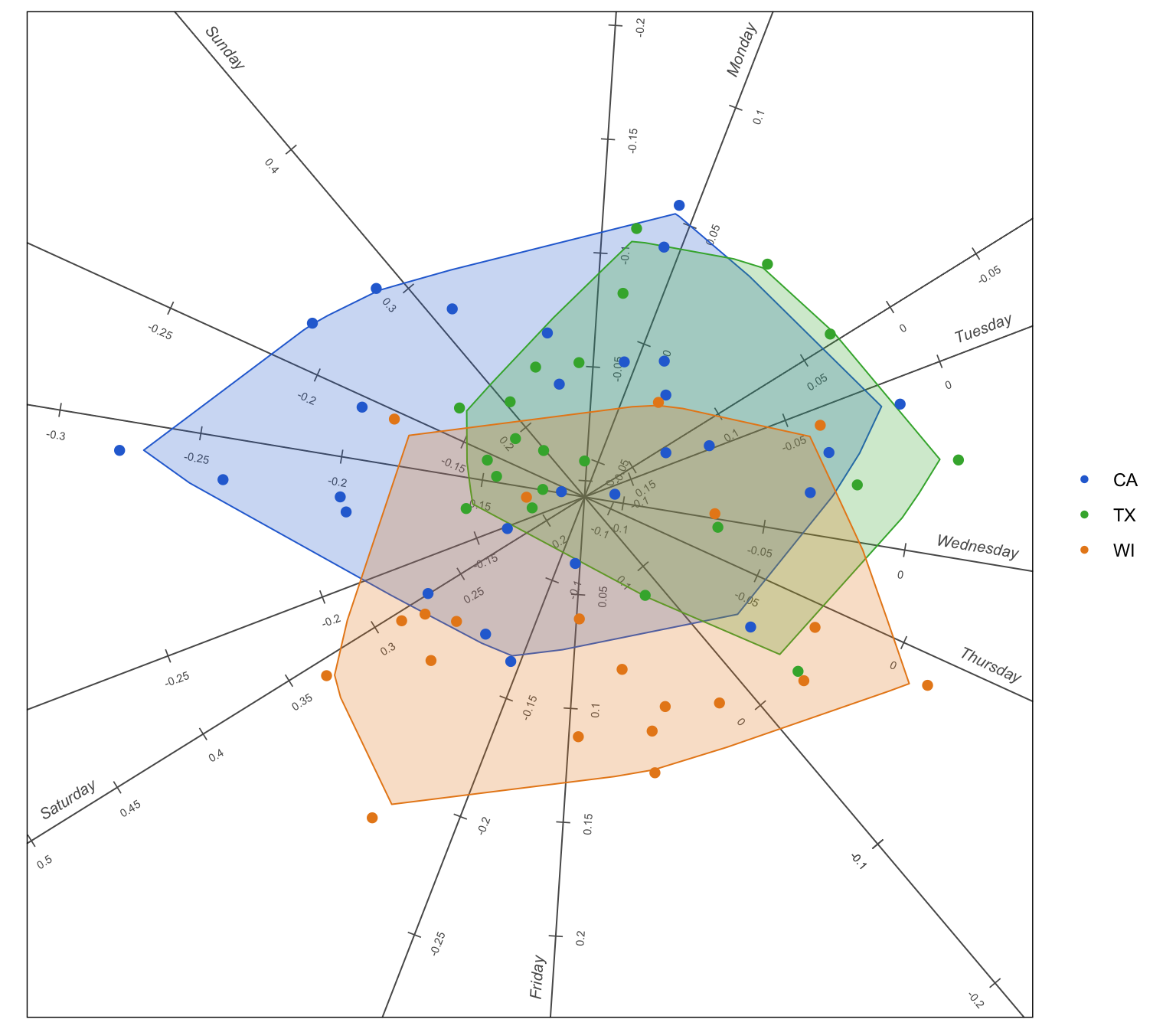
PCA biplot of the weekday panel. Each point is one store department, coloured by state and each shaded region is an alpha bag enclosing the central 95 percent of its state’s points. The seven axes are the days of the week, calibrated in log ratios to the store department’s own average day.
This two-dimensional picture reproduces 92 percent of the variation in the seven-column table, so it is a good summary.
Read the axes first. Saturday and Sunday point to the left and Monday to Thursday point to the right, with Friday pointing down between them. The tick marks on the Saturday axis reach 0.4 and beyond; a log ratio of 0.4 is about 50 percent above the store department’s average day. On the Tuesday to Thursday side the ticks are negative. So every store department sells more on the weekend, which is no surprise. The biplot is centred, so what the spread of points shows is how each store department departs from that shared pattern.
The states do not have the same weekend. The Wisconsin bag sits low in the picture, pulled along the Saturday and Friday axes. The California bag stretches up and to the left, along the Sunday axis and Texas sits between them. Projecting the points onto the axes confirms it: in Wisconsin the Friday lift is positive and the Sunday lift is less than half of California’s, while California’s peak day is Sunday. In simple terms, Wisconsin’s weekend shopping starts on Friday and peaks on Saturday and California’s peaks on Sunday. Texas is in between.
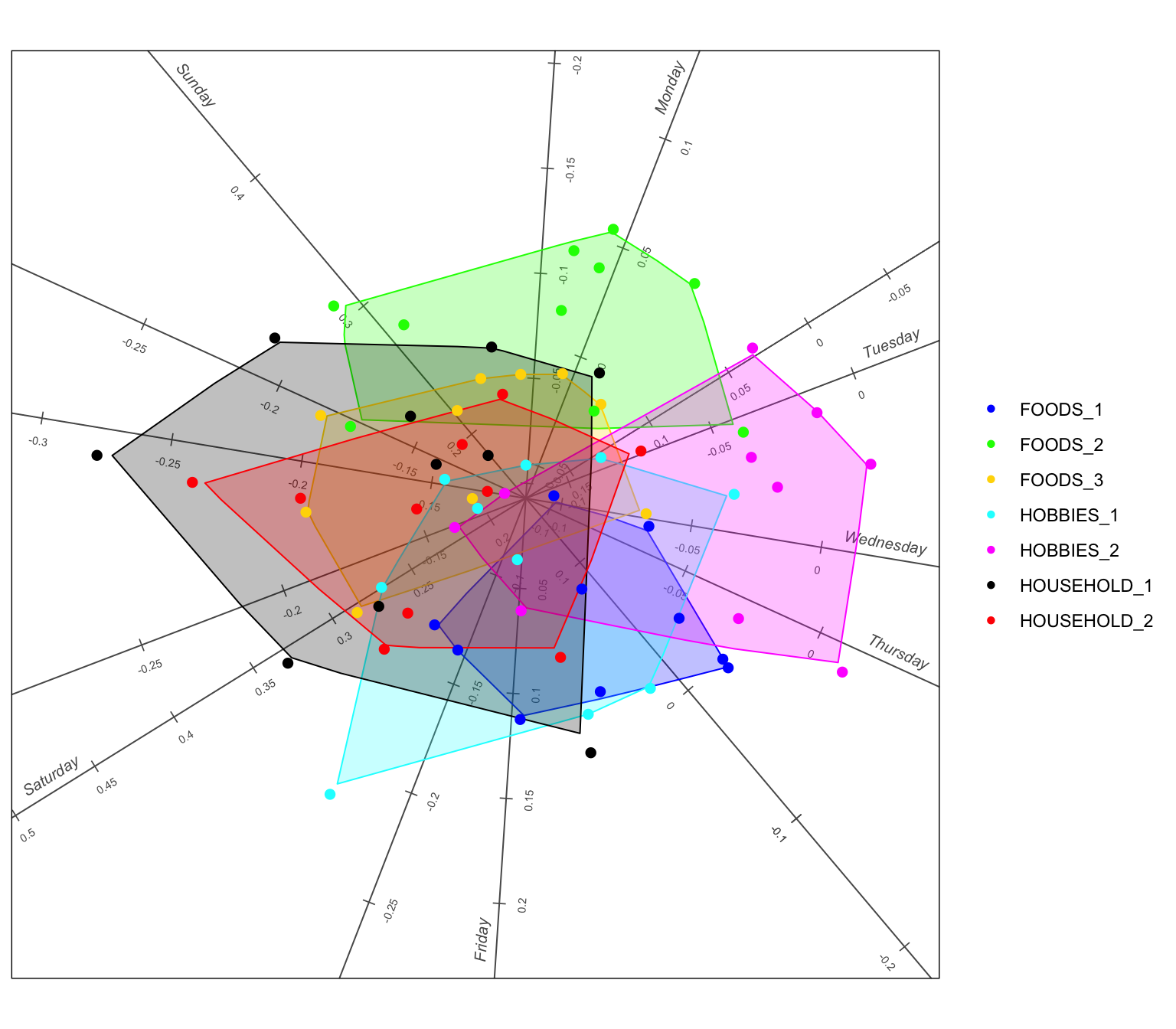
The same weekday biplot, now with the points coloured by department and one alpha bag per department.
Departments differ less than states do. Colouring the same points by department gives bags that overlap much more, which says that where a department is matters more for its weekly movement than what it sells. Still, two departments stand out. HOBBIES_2 (magenta) hugs the right side of the picture near the weekday axes: its weekend lift is the smallest of any department, only around 10 percent above its average day. HOUSEHOLD_1 (black) reaches furthest to the left: household goods have the biggest weekend swing, with Saturdays around 25 percent above average and midweek days around 15 percent below. FOODS_2 (green) sits highest in the picture because its lift carries over into Monday, the only department for which Monday is an above-average day.
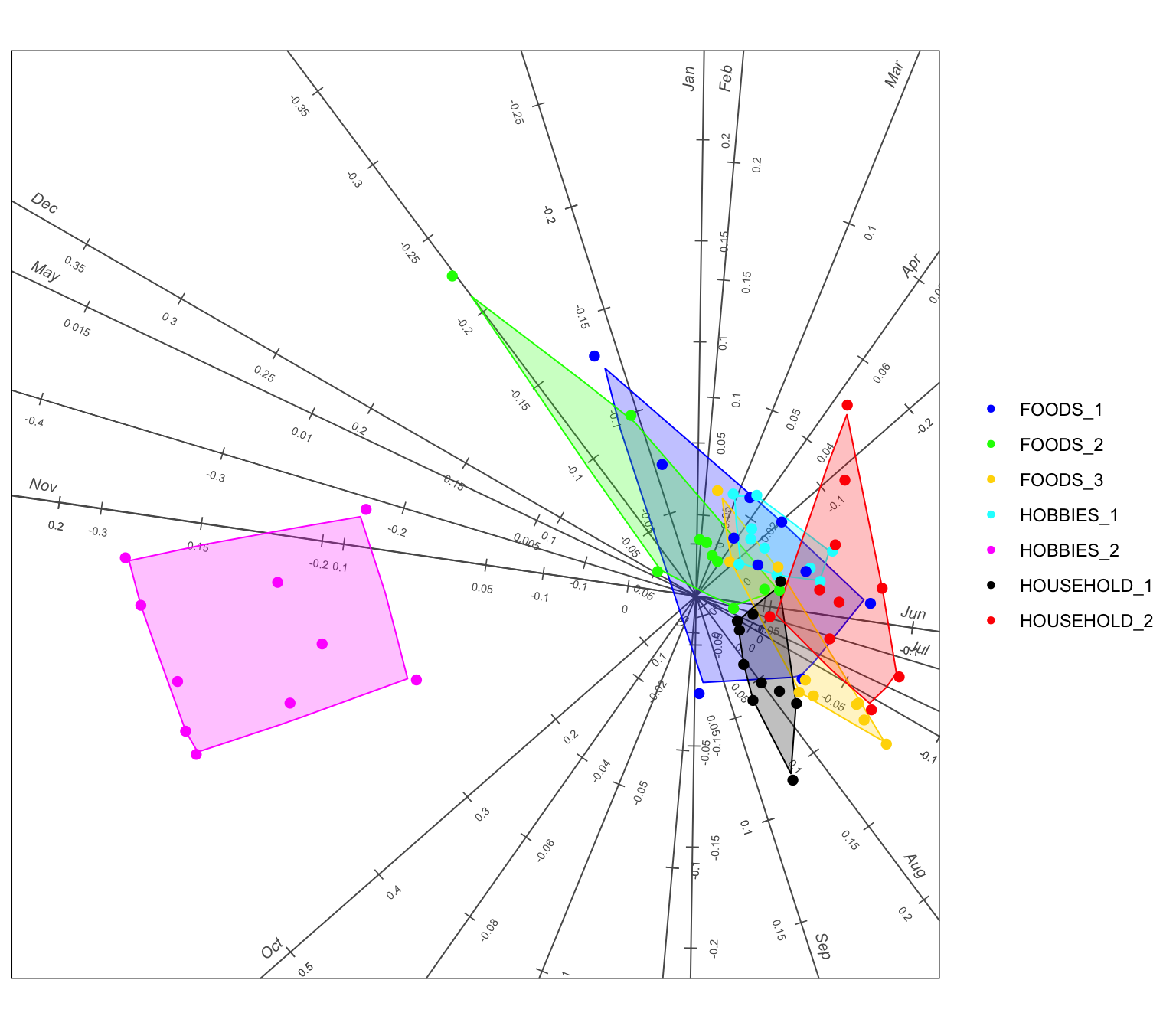
PCA biplot of the month panel. Points are the same 70 store departments, coloured by department with an alpha bag per department. The twelve axes are the months of the year, again calibrated in log ratios to the store department’s own average day.
The month picture explains 75 percent of the variation, less than the weekday picture and one glance shows why: most of that variation belongs to a single department.
One department has a season. The HOBBIES_2 bag sits far to the left, alone, in the direction of the October, November and December axes and directly away from June and July. Reading off the calibrations, an average HOBBIES_2 department sells about 40 percent more per day in October than in a typical month and about 20 percent more in December, but roughly 20 to 25 percent less in June and July. The other six departments crowd together near the origin, which means their sales barely change from month to month. Whatever HOBBIES_2 contains, it is the seasonal, run-up-to-the-holidays part of the shop.
Not every month is worth an axis.biplotEZ reports how well each axis is represented in the picture. October scores 0.98 and June to August all score above 0.85, so the picture reproduces those months well. May scores 0.01: the May axis is drawn but is essentially useless, because May is the one month in which nothing distinguishes one store department from another.
A few individual outliers. Away from the HOBBIES_2 cluster, the point that strays furthest is FOODS_2 in store WI_1, up and to the left, away from the June to August axes and towards January. It sells about 20 percent more in January and 20 percent less in June to August than its average, a winter pattern that none of the other food departments share. TX_3’s FOODS_1 department shows a milder version of the same thing.
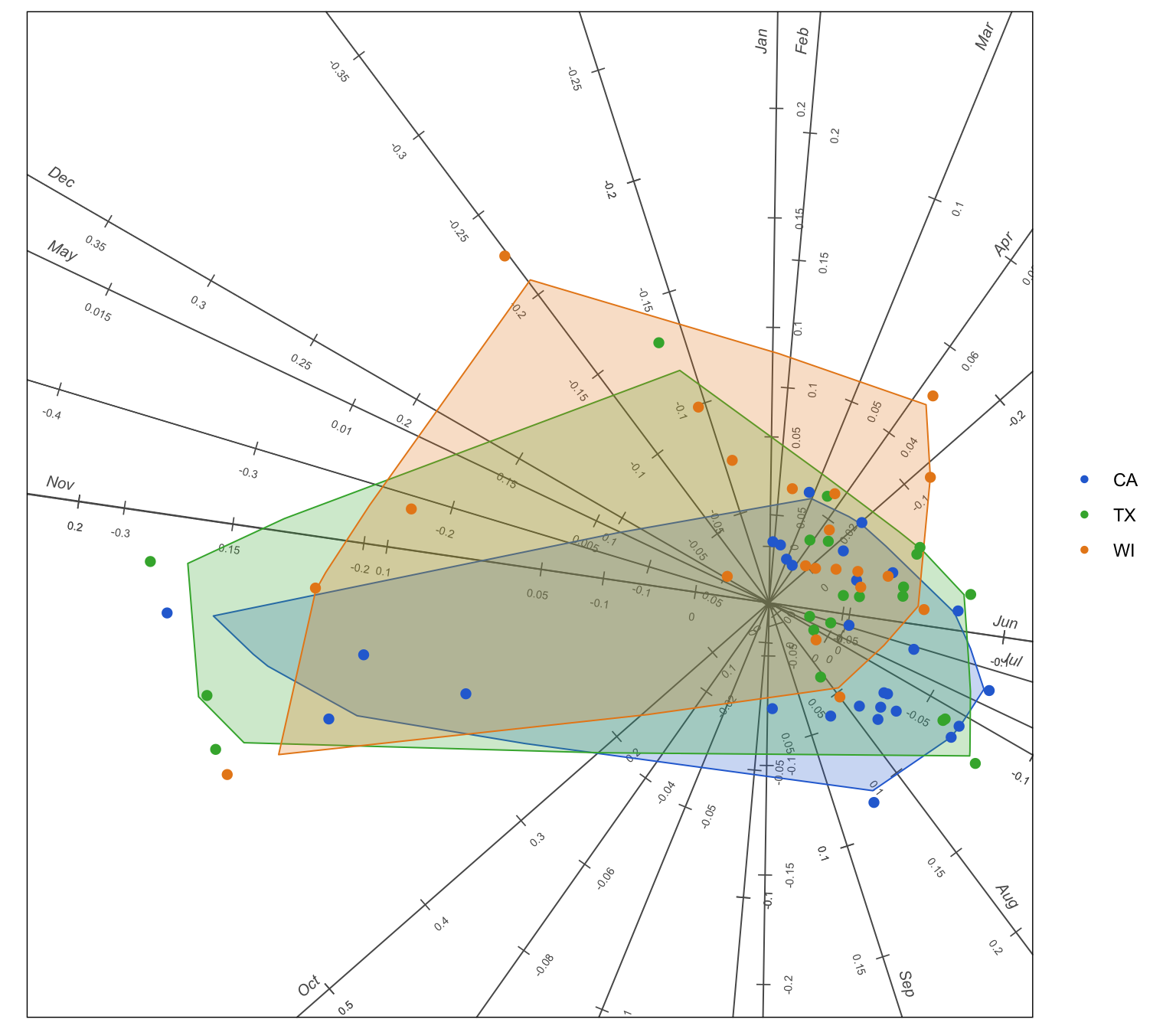
Geography barely matters over the year. Coloured by state, the three bags lie almost on top of one another. Wisconsin’s bag reaches a little further towards February and March and a little less towards July, so its stores are slightly quieter in summer, but this is a small effect next to the weekday differences. The yearly movement is set by the goods on the shelf and the weekly movement by where the shelf stands.
Take-aways
Everyone sells more on the weekend, but the states disagree on which day is the weekend: Saturday in Wisconsin, Sunday in California, with Texas in between.
What a department sells barely changes its weekly movement, except that household goods have the biggest weekend swing and HOBBIES_2 the smallest.
Over the year the roles reverse. The state makes almost no difference, while one department, HOBBIES_2, has a strong October to December season that no other department shares.
Expressing every cell as a log ratio to its own average is what made this possible. It removed the enormous differences in volume between departments and left only the shape of the movement, which is what the question was about.
NoteReproduce this post
This post uses the development version of biplotEZ from GitHub. Install it with remotes::install_github("MuViSU/biplotEZ") and install.packages("geometry") for the alpha bags, then run the code chunks above. The two panel files weekday_panel.csv and month_panel.csv sit next to this post. To rebuild them from the raw Kaggle data, download the M5 Forecasting Accuracy files from Kaggle into a data/ folder and run the aggregation chunk, which needs the data.table package.